The comma-separated or tab-separated value is the go-to source for data analysis. If you have a CSV or TSV file on hand, almost any business intelligence, data visualization, or advanced analytics tool can handle it.
Even Microsoft Excel can handle CSV and TSV files, provided they are not too large.
And that’s the challenge: When it comes to big data, which may span millions of rows and columns, spending time trying to analyze CSV and TSV files can be an expensive slog, says Charles Pritchard, a big data expert at Expedia.
“I’ve seen companies blow $1 million on learning how to grab CSV files with their own custom code,” Pritchard said. “They have to connect to the API as well as grab data from a server. And I end up seeing 12-to-18 month projects, and I am thinking if someone could have provided the file in an optimized format, we could have cut down that project scope tremendously.”
Pritchard advocates use of the optimized-row columnar (ORC) file, which grew out of Apache Hive as an effort to speed the efficiency of data stores in Hadoop. ORC files have several innovations:
Optimized storage format: The files contain groups of row data called stripes, under which the first 10,000 rows are stored in the first column, then the second 10,000 rows beneath the first column.
Indices: At the end of each set of 10,000 rows, an in-line index calculates the minimum, maximum, and sum values.
Faster analysis and compression: The ORC format also allows users to skip row groups that don’t contain certain filters. Auxiliary information is contained in a file footer, and a postscript holds compression parameters.
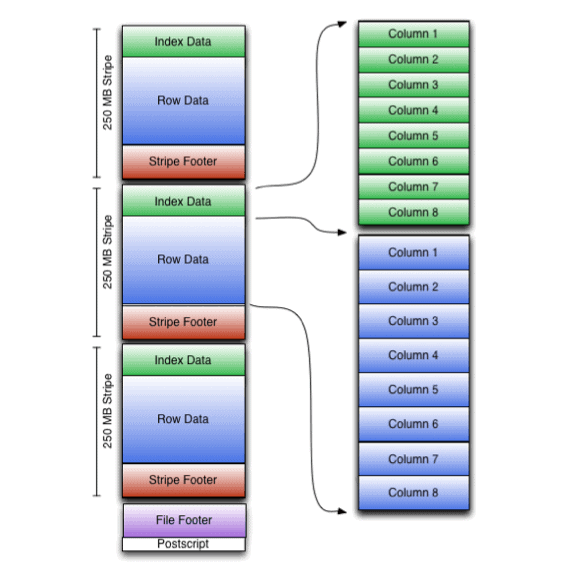
ORC file layout. Graphic credit: Apache Software Foundation.
“It cuts down tremendously in the size of the file and the processing time needed to access the file,” Pritchard said. “Ten gigs of compressed ORC can hold the same data as 500 gigs of uncompressed CSV, depending on the data.”
Under the ORC format, users can also skip entire blocks of 10,000 rows, “making it much faster for processing in a big data world,” he said.
Big data analysis and CSV files: a match made in hell?
Pritchard offered an example of log files from website visits. Those log files may contain millions of rows of data. A program such as Adobe Site Catalyst, which is designed to enhance user experience on websites, will store unique identifiers for website visitors—where they are from and numerous interactions with various website pages. For a Fortune 500 company, the amount of data generated from their website can be enormous, and it often comes in the form of CSV or TSV files – some of them 200 to 300 columns wide for every user interaction.
Imagine trying to analyze user interactions on a website with the file in that format.
“The vast majority of the data is repeated for that user visit. So you’ll see a user interact a few dozen times on a website in a day: their browser info isn’t changing, their IP isn’t changing, etc. But it’s all repeated in the CSV/TSV file,” Pritchard said. “There’s room to compress that in standard CSV/TSV, but ORC really shines here.”
Existing data tools might cap out trying to analyze such data, which may also have to undergo data filtering to identify certain variables. The project then gets sent to the engineering team.
“And it ends up as a mix,” Pritchard said. “So they’ll end up using kind of some · programs and start manually doing things and copying and pasting values into spreadsheets to get aggregates.” Fusing that data with data stored in another system, say for example customer relationship management, might be another project.
“The journey of doing that and the code that is kind of created it and wasted – it’s not trivial,” Pritchard said. “I’ve seen developers write thousands and thousands of lines of code.” Even in cases where code has been developed to take CSV and TSV files and translate them to ORC format, developers still need to perform quality assurance on the data to make sure nothing was lost in conversion.
So what has to happen to speed the process? Analytics and business intelligence vendors, who offer CSV and TSV compatibility, need to do the same with ORC functionality.
Sound too simple? Pritchard will be speaking more on the subject at the Data Platforms 2017 conference.

 Best Practices for Deploying and Scaling Industrial AIArtificial Intelligence (AI) is transforming industrial operations, helping organizations optimize workflows, reduce downtime, and enhance productivity. Different industry verticals leverage AI in unique ways.Link to The Center for Adaptive Edge Intelligence
 The Center for Adaptive Edge IntelligenceAdaptive edge intelligence brings real-time decision-making to the point of data creation, whether from sensors, machines, or cameras.Link to The Value of Vehicle Electrification
 The Value of Vehicle ElectrificationElectric vehicles (EVs) present automakers with many design, engineering, and manufactu ring challenges.Link to Accelerating Manufacturing Digital Transformation with Industrial Connectivity and IoT
 Accelerating Manufacturing Digital Transformation with Industrial Connectivity and IoTDigital transformation is empowering industrial organizations to deliver sustainable innovation, disruption-proof products and services, and continuous operational improvement.Link to Smart Manufacturing for Automotive
 Smart Manufacturing for AutomotiveLeading a transportation revolution in autonomous, electric, shared mobility and connectivity with the next generation of design and development tools.Link to Center for Data Pipeline Automation
 Center for Data Pipeline AutomationAs businesses become data-driven and rely more heavily on analytics to operate, getting high-quality, trusted data to the right data user at the right time is essential.Link to Center for Automated Integration
 Center for Automated IntegrationThe goal of automated integration is to enable applications and systems that were built separately to easily share data and work together, resulting in new capabilities and efficiencies that cut costs, uncover insights, and much more.Link to Continuous Intelligence: Insights
 Continuous Intelligence: InsightsDigital transformation requires continuous intelligence (CI). Today’s digital businesses are leveraging this new category of software which includes real-time analytics and insights from a single, cloud-native platform across multiple use cases to speed decision-making, and drive world-class customer experiences.